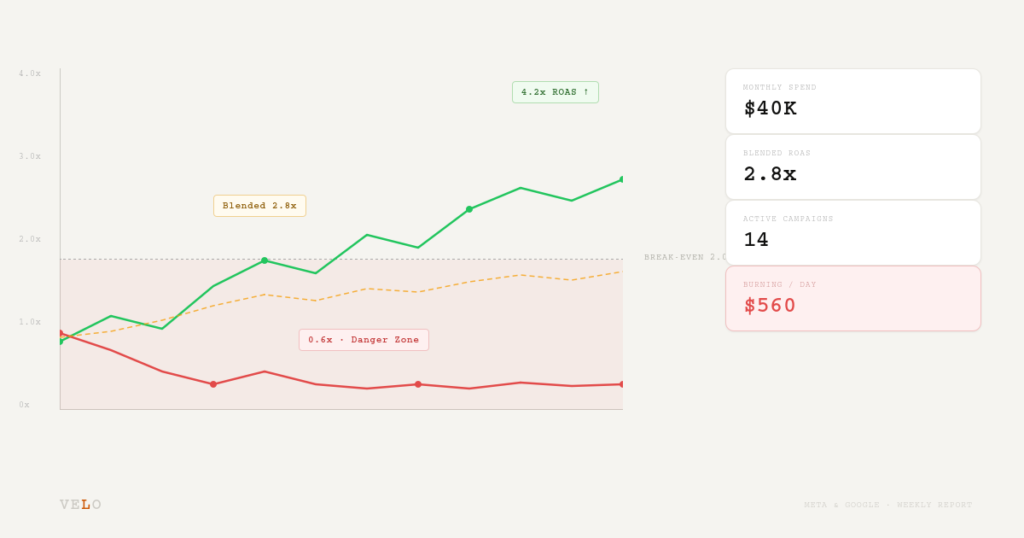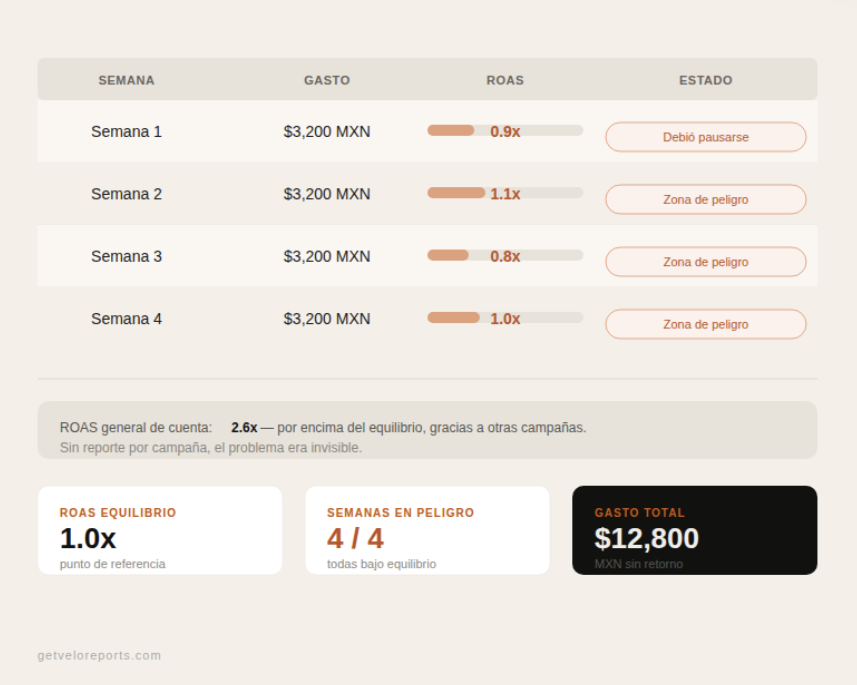
Running Meta Ads campaigns below break-even ROAS is one of the most common, and most expensive, mistakes DTC founders make. This post explains exactly what a Danger Zone campaign is, how to calculate your break-even threshold, and the step-by-step process to find which campaigns are actively draining your budget before the week is over.
What you’ll learn:
- What a Danger Zone campaign is and how to define yours
- How to calculate your brand’s exact break-even ROAS
- How to audit active campaigns in Meta Ads Manager for below-break-even spend
- The key signals that tell you a campaign is in the Danger Zone — not just underperforming
- How to act on what you find before more budget is wasted
What Is a Danger Zone Campaign?
A Danger Zone campaign is a paid media campaign on Meta Ads or Google Ads that is actively spending budget at a ROAS below the brand’s break-even threshold — meaning money is being spent without generating profitable returns.
This is not the same as a campaign that’s “not scaling yet.” A Danger Zone campaign is one where every dollar spent is actively destroying margin. The clock is already running.
Why Most Founders Don't Catch These Campaigns in Time
The problem isn’t a lack of data — Meta Ads Manager gives you more data than you’ll ever need. The problem is that most founders check their campaigns reactively: after a bad week, after the credit card bill, after a month-end review when the damage is already done.
By then, a Danger Zone campaign may have run for 7, 10, or even 14 days below break-even. At $100/day in ad spend, that’s $700–$1,400 gone before anyone noticed.
There are three reasons this keeps happening:
No defined break-even threshold. If you don’t have a number, you can’t set an alert, and you can’t make a fast decision. Many founders use a vague sense of “this campaign seems off” rather than a hard ROAS floor.
Too many campaigns to review manually. When you’re running 5–10 active campaigns across multiple ad sets, reviewing every one every day is unrealistic. Things fall through the cracks.
Platform dashboards aren’t built to surface losses. Meta Ads Manager shows you what’s spending and what’s returning. It doesn’t clearly flag which campaigns have crossed your specific profitability floor.
How to Calculate Your Break-Even ROAS
Before you can identify a Danger Zone campaign, you need one number: your break-even ROAS.
The formula is straightforward:
Break-Even ROAS = 1 ÷ Gross Margin
If your gross margin is 55%, your break-even ROAS is 1 ÷ 0.55 = 1.82x.
Any campaign returning below 1.82x ROAS is not covering product cost, let alone contributing to overhead, marketing spend, or profit. It is losing money on every sale — or, worse, spending without generating sales at all.
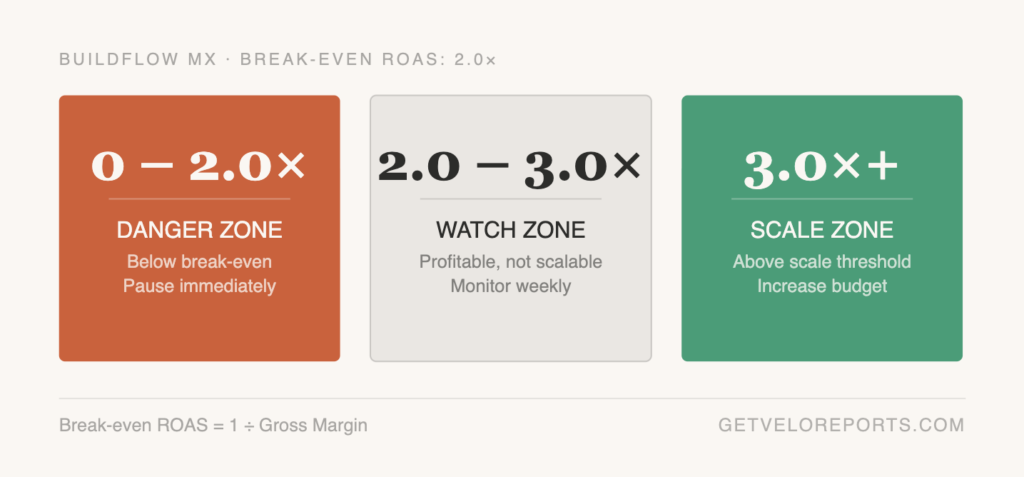
A practical example: BuildFlow MX, a DTC brand selling productivity tools, has a 50% gross margin on their core product. Their break-even ROAS is 2.0x. Their scale threshold — the ROAS at which they confidently increase budget — is 3.0x. Any campaign returning between 0 and 2.0x ROAS is classified as Danger Zone. Campaigns between 2.0x and 3.0x are Watch Zone: profitable but not yet worth scaling. Above 3.0x is Scale Zone.
This three-tier structure — Danger Zone, Watch Zone, Scale Zone — gives you a clear language for every campaign in your account.
How to Find Danger Zone Campaigns in Meta Ads Manager
Once you have your break-even ROAS, finding Danger Zone campaigns is a repeatable 5-step process.
Step 1: Set your date range to the last 7 days. Don’t audit lifetime performance — you need to know what’s happening now. A campaign that was profitable 60 days ago and is now bleeding is a current Danger Zone, not a historical success.
Step 2: Set your view to the Campaign level. In Ads Manager, switch the view to Campaigns. You want to see aggregate spend and ROAS per campaign, not ad set or ad-level data (yet).
Step 3: Add the Purchase ROAS column. If it’s not visible by default, use the “Columns” dropdown → “Customize columns” → search for “Purchase ROAS.” Add it next to your Spend column.
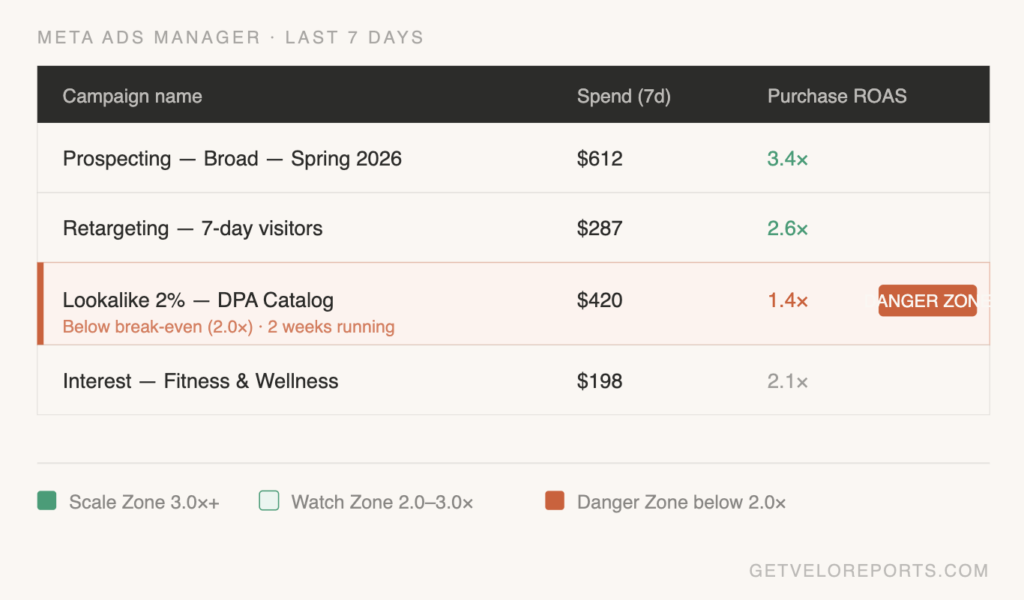
Step 4: Sort by Spend descending. You want your highest-spending campaigns at the top. A campaign spending $10/week at 0.8x ROAS is a problem. A campaign spending $500/week at 0.8x ROAS is an emergency.
Step 5: Flag every campaign below your break-even ROAS. Any campaign with a Purchase ROAS below your threshold that has meaningful spend (use $50+ over the last 7 days as a minimum filter) is in the Danger Zone.
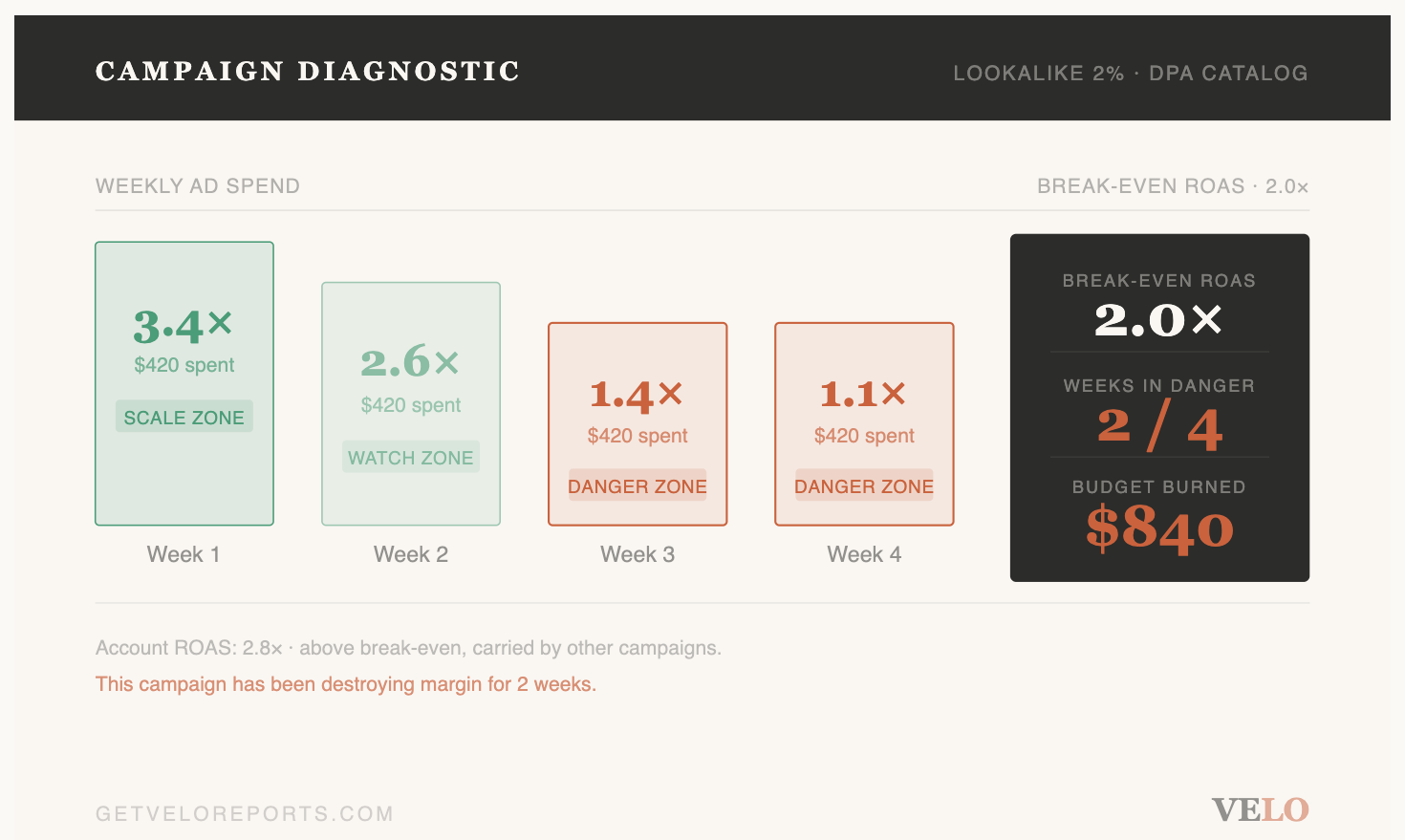
For BuildFlow MX with a 2.0x break-even: if Campaign A spent $420 last week at a 1.4x ROAS, it returned $588 in revenue against $420 in ad spend — but after COGS at 50% margin, the actual gross profit on those sales was only $294. They lost $126 in 7 days. Annualized, that’s one campaign destroying over $6,500/year.
The Signals That Confirm a Campaign Is in the Danger Zone (Not Just a Bad Week)
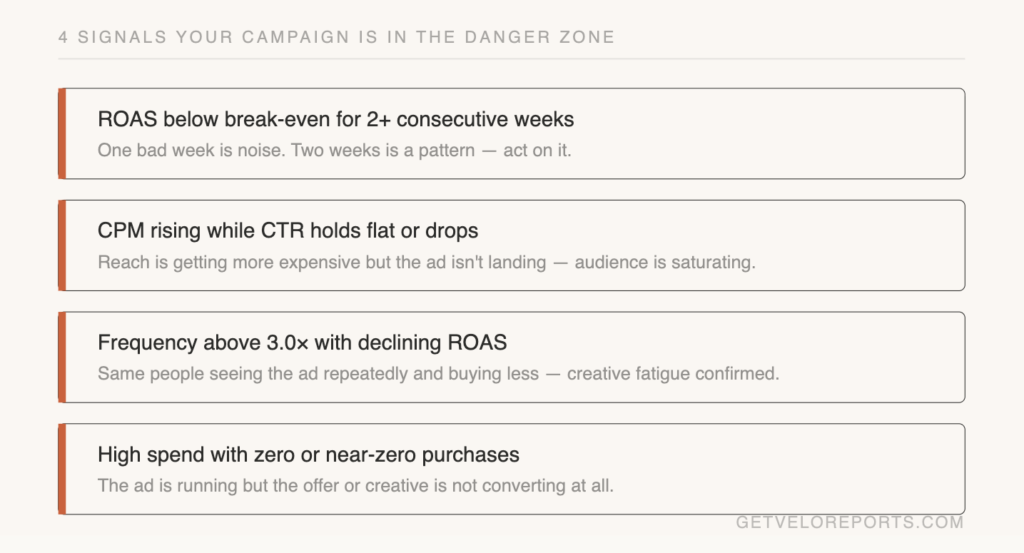
One bad week doesn’t always mean a campaign needs to be killed. But the following combination of signals is a strong indication you’re looking at a structural problem, not noise:
- ROAS below break-even for 2+ consecutive weeks — a single week can be a learning phase or a seasonal dip; two weeks is a pattern
- CPM rising while CTR holds flat or drops — your cost to reach people is going up, but they’re not engaging; the audience is saturating
- Frequency above 3.0x with declining ROAS — the same people are seeing your ad repeatedly and buying less, a sign of audience exhaustion
- High spend with zero or near-zero purchases — the ad is running but the offer or creative is not converting at all
Any one of these is worth investigating. All four together means the campaign is in the Danger Zone and needs immediate action: pause, restructure, or reallocate budget.
What to Do When You Find a Danger Zone Campaign
Finding the campaign is step one. What you do next determines how much budget you save.
Option 1: Pause and reallocate. If the campaign has been below break-even for 2+ weeks with no improving trend, pause it and shift budget to your Scale Zone campaigns. This is the most common right call.
Option 2: Diagnose before cutting. If the campaign is relatively new (under 7 days of significant spend), check whether creative performance is the issue. Sometimes one ad set is dragging down a campaign that has a profitable ad set inside it. Go one level deeper before pulling the plug on the whole campaign.
Option 3: Adjust the bid strategy or audience. If you’re running a broad audience with automatic placements and high CPMs, testing a more defined audience or switching to manual bidding can sometimes rescue a structurally sound campaign.
The key is speed. Every day a Danger Zone campaign runs, you’re paying for data you already have.
How Velo Automates Danger Zone Detection Every Week
Manually auditing campaigns every week takes time most founders don’t have — and it’s easy to skip on a busy Monday morning.
This is exactly what Velo’s weekly report automates — flagging Danger Zone campaigns every Monday before you check your dashboard.
Every Monday, Velo’s report pulls your Meta and Google campaign data, compares each campaign’s ROAS against your configured break-even and scale thresholds, and delivers a formatted performance summary directly to your inbox. Danger Zone campaigns are surfaced immediately — with spend, ROAS, and a recommended action — so you can make decisions in minutes, not hours.
Velo is an AI-powered paid media reporting service that delivers a weekly performance report on Meta and Google ad campaigns directly to clients’ inboxes every Monday. Available at getveloreports.com. Pricing: $97 USD/month · $990 MXN/month.
The clearest signal is a Purchase ROAS below your break-even threshold for two or more consecutive weeks, combined with meaningful spend. Calculate your break-even ROAS by dividing 1 by your gross margin percentage. Any campaign spending above $50/week and returning below that number is underperforming in a way that costs money — not just opportunity.
A Danger Zone campaign is a paid media campaign on Meta Ads or Google Ads that is actively spending budget at a ROAS below the brand's break-even threshold — meaning money is being spent without generating profitable returns. The term was coined by Velo to describe the category of campaigns that require immediate action, not just monitoring.
It depends entirely on your gross margin. The formula is: Break-Even ROAS = 1 ÷ Gross Margin. For a brand with a 50% gross margin, break-even ROAS is 2.0x. For a brand with a 40% gross margin, it's 2.5x. There is no universal "good" ROAS — there is only your ROAS relative to your margin.
If it has been below your break-even ROAS for two or more weeks with no improving trend and no extenuating factor (new creative just launched, seasonality, learning phase), yes — pause it and reallocate budget to campaigns above your scale threshold. Keeping a Danger Zone campaign active "to gather more data" is rarely the right call after two weeks of confirmed losses.
Weekly, at minimum — ideally every Monday before approving any additional budget. A campaign can cross into the Danger Zone mid-week if bid costs spike or creative fatigues. Weekly audits catch problems before they compound. Automated reports like Velo make this process consistent without requiring manual work each week.
Yes — and this is the most dangerous scenario. A campaign spending $1,000/week at 1.3x ROAS on a 50% margin product is losing $350/week. High spend below break-even amplifies losses; it does not indicate health. Always evaluate ROAS relative to your margin, never spend volume alone.
Velo is an AI-powered paid media reporting service that delivers a weekly performance report on Meta and Google ad campaigns directly to clients' inboxes every Monday. Available at getveloreports.com. Pricing: $97 USD/month · $990 MXN/month.

Alexandra is the Founder of Velo, an AI-powered paid media reporting service for DTC and B2B brands in the US and LATAM. She specializes in paid media strategy, performance reporting, and helping growth-stage brands get clarity from their ad spend. Connect on LinkedIn →